Prompt Engineering Guide
Prompt Engineering Guide
Table of Contents
Prompt Engineering Guide
Introduction
The rise of Large Language Models (LLMs) has brought exciting possibilities for human-computer interaction. However, to fully unlock the potential of these powerful AI models, one crucial skill is required: prompt engineering.
This rapidly evolving field focuses on crafting effective prompts that leverage the capabilities of LLMs, enabling them to understand intent, follow instructions, and generate desired outputs. As AI becomes increasingly embedded in various applications, prompt engineering plays a critical role in ensuring accurate, relevant, and safe interactions.
Roles of Prompts
In AI dialogue, system, user, and assistant are the core interaction roles, while tool/function serves as an extension that enhances the assistant's capabilities.
1. System: The Invisible Rule Setter
The system role consists of instructions preset by developers. These are not exposed to users directly but instead guide the assistant, defining boundaries, scope, tone, and style—essentially serving as the AI's instruction manual.
Core Functions:
- Define identity and goals
Example: "You are a professional math tutor. Explain junior-high math step by step, and avoid advanced math terminology." - Set interaction rules
Example: "If a user asks non-math questions, politely redirect to math. Keep answers under 300 words and emphasize formula derivation." - Provide background information
Example: "Here is a company's product specification sheet. When asked about products, only use this sheet and do not invent information." - Define output format
Example: "When using the calculator, respond strictly in the format: [Tool: Calculator, Parameters: {expression: '2+34', precision: integer}]"
2. User: The Origin of Demand
The user role represents the source of interaction—the user expresses needs through text, voice, images, or other forms. User inputs serve as the primary basis for the assistant's responses.
Core Functions:
- Initiate requests
Example: "Calculate the number of working days in May 2024" / "Explain the core principles of relativity" / "Write a product marketing copy." - Provide additional details
Example: Assistant asks: "Is your product in electronics or cosmetics?" User: "Cosmetics—lipstick." - Feedback and adjustment
Example: "The copy sounds too formal. Can you make it more playful?" / "The calculation is wrong, check again."
3. Assistant: The Executor and Bridge
The assistant is the AI system's visible role. Its core duties are to interpret system rules + parse user intent + produce compliant responses. In systems with tools, it also decides whether and how to invoke them.
Core Functions:
- Understand intent
Example: User asks "Should I bring an umbrella tomorrow?" → Assistant interprets as "Check tomorrow's rainfall probability." - Directly respond
Example: "The core principle of relativity is…" / "2 + 3 = 5." - Decide tool use
Example: "Call weather API for Beijing's forecast" / "Call calculator for 12345 × 6789." - Integrate tool results
Example: Tool returns: "Beijing May 1, 2024: Rain probability 60%." Assistant says: "Beijing's rain chance is 60%. We suggest carrying an umbrella."
4. Extended Role: Tool/Function – Assistant's Power Extension
Tools and Functions handle tasks that the assistant cannot perform on its own. They are essentially callable programs, APIs, or services, e.g., weather APIs, calculators, document parsers, or map services.
Without tools, assistants rely solely on training data. With tools, they can access real-time info, perform complex operations, and support far broader use cases.
Core Functions:
- Fill capability gaps: Handle tasks beyond model limitations.
- Improve precision: Avoid outdated/guessed answers (e.g., get live stock prices instead of relying on old data).
- Reduce user effort: Users state their needs, the Assistant handles tool calls automatically.
Role Interaction Logic
User asks for the PM2.5 index of Santa Clara, California on May 1, 2024, and requests an analysis report.
Workflow:
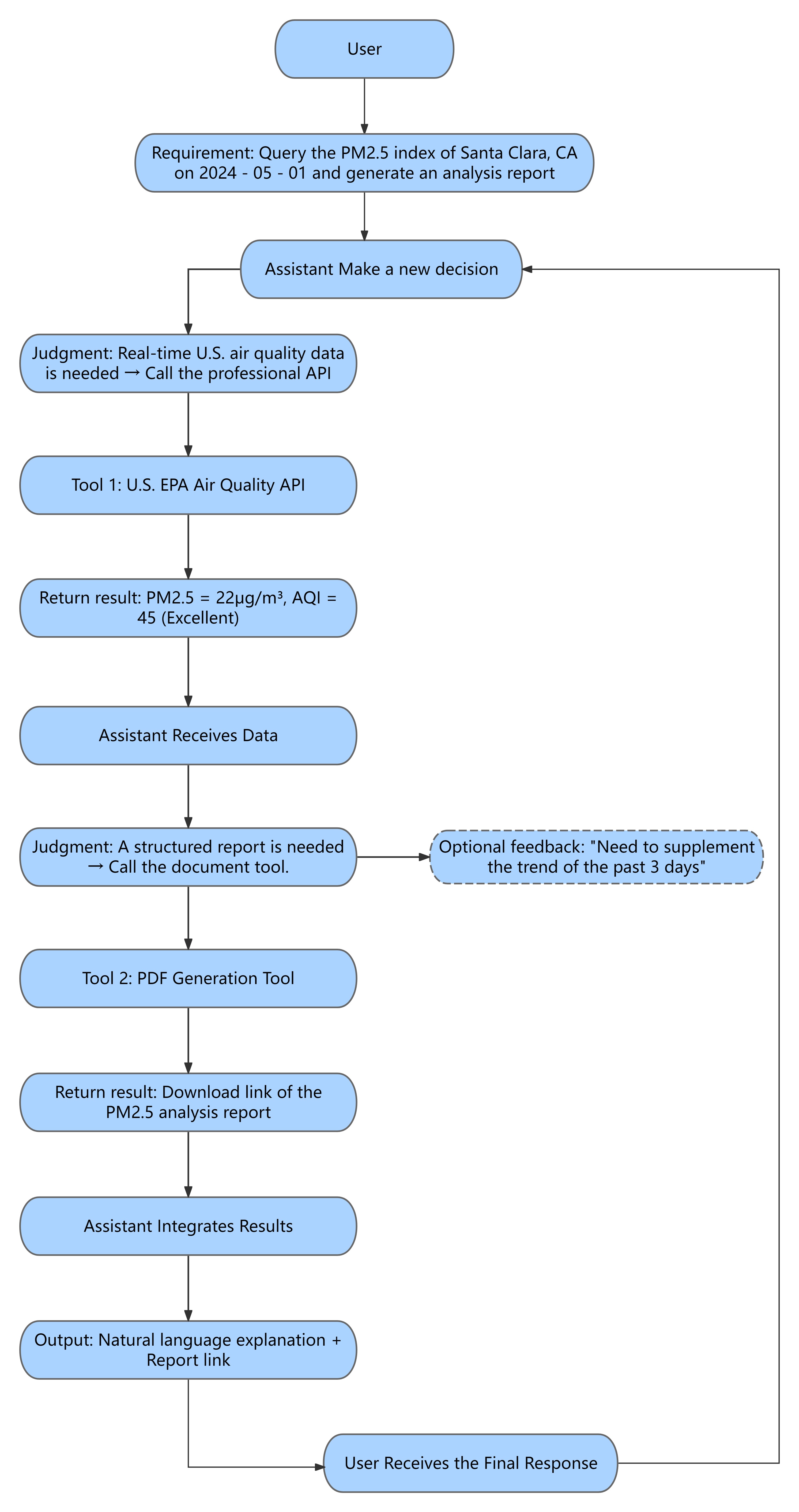
- System preset rule: "Must call Air Quality API; report must include index value + grade + health advice, and provide a download link."
- User initiates: the query and later receives the result.
- Assistant acts as decision-maker: decides to call both the Air Quality API and a PDF report generator.
- Tool executes: returns live data and generates the report.
Benefits of Prompt Engineering
- Improved model performance: Clear prompts yield more accurate, relevant, and informative responses.
- Bias & harm reduction: Well-crafted prompts help reduce biased or unsafe outputs, when combined with model-level safeguards.
- Greater control & predictability: Prompts guide model behavior toward consistent, expected results.
- Enhanced user experience: Clear prompts enable smoother, more intuitive interactions.
Strategies for Writing Better Prompts
1. Define clear goals
| Strategy | Example |
|---|---|
| Use action verbs | Write a bullet-point summary of the attached research paper's key findings. |
| Set output length/format | Write a 500-word article about climate change impacts on coastal communities. |
| Specify target audience | Draft product descriptions for an organic skincare line, targeting eco-conscious young adults. |
2. Provide context & background
| Strategy | Example |
|---|---|
| Include facts/data | Considering global temperatures have risen 1°C since pre-industrial times, discuss the impacts of sea-level rise. |
| Reference documents | Analyze the company's profitability over the past 5 years based on the attached financial report. |
| Define key terms | Explain quantum computing in simple terms for non-technical readers. |
3. Use few-shot prompting
| Strategy | Example |
|---|---|
| Give input-output examples | Input: Cat → Output: A small furry mammal with whiskers. Input: Dog → Output: A loyal domesticated animal. Question: Elephant? |
| Demonstrate style/tone | Example (Humorous): This politician's speech is so dull it could cure insomnia. Example (Formal): "This statesman delivered a rich and engaging address." Prompt: Write a description of a comedian's stand-up performance. |
| Show level of detail | Example (Brief): This movie is about a boy befriending an alien. Example (Detailed): A sci-fi film about Elliott, a lonely boy who discovers an alien stranded on Earth and builds a special bond. Prompt: Summarize the novel you just read. |
4. Use chain-of-thought prompting
| Strategy | Example |
|---|---|
| Encourage step-by-step reasoning | Solve step by step: Xiao Qiang has 5 apples and eats 2. Step 1: He starts with 5. Step 2: Eats 2, so subtract. Step 3: 5 – 2 = 3. Answer: 3 apples left. |
| Ask model to explain reasoning | Explain your reasoning for classifying this movie review: The acting was great, but the plot was predictable. |
| Guide logical flow | To classify an email as spam, consider : (1) Is the sender known? (2) Does subject line contain suspicious keywords? (3) Is content too good to be true? |
Share